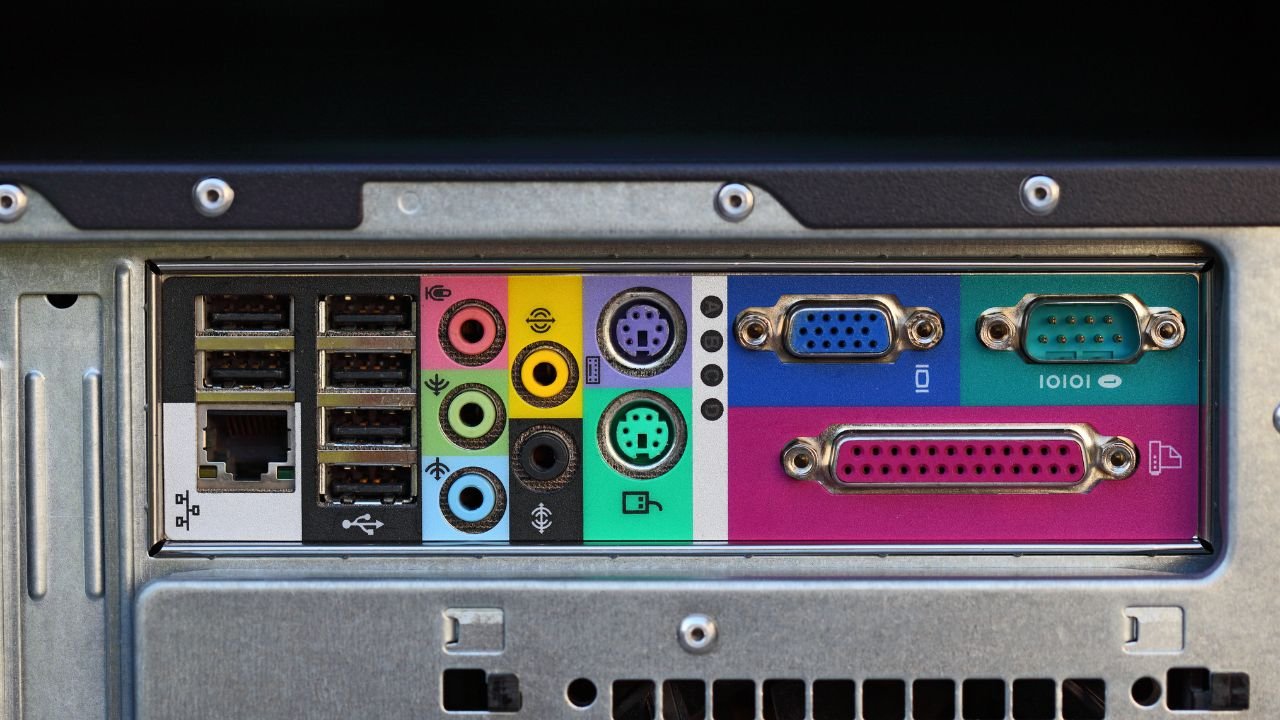
Computer ports are one of the most important topic in Computer Awareness. Questions related to PS/2 Port, Serial Port, Parallel Port, USB Port, Ethernet (RJ-45) Port, FireWire, VGA Port, and HDMI Port are frequently asked in SSC, JKSSB, Banking, Railway, Defence, Police, State PSC, and other competitive examinations.
In this article, Exam Waves Coaching Academy explains all important computer ports in very simple language, along with their uses, pin details, and important facts for competitive exams.
What is a computer port?
A computer port is a physical connection point used to connect external devices to a computer. Ports help in the transfer of data, audio, video, and network signals between the computer and other devices.
Simple definition
Computer Port = A connector used to attach external devices to a computer.
Examples include:
- Keyboard
- Mouse
- Printer
- Monitor
- Projector
- Modem
- Internet cable
Why are computer ports important?
Computer ports allow communication between the computer and external devices. Different ports are designed for different purposes, such as:
- Connecting a keyboard
- Connecting a mouse
- Connecting a printer
- Connecting a monitor
- Connecting to the Internet
- Connecting multimedia devices
PS/2 Port
The PS/2 Port is also known as Personal System/2 Port.
It is mainly used to connect:
- Keyboard
- Mouse
Download Our Computer Master Guide 2026

Important facts
- Developed by IBM.
- Uses a 6-pin connector.
- Color coding:
- Green – Mouse
- Purple – Keyboard
The PS/2 port was commonly used in older desktop computers.
Serial Port
A Serial Port transfers data one bit at a time through a single wire.
Features
- Data is transmitted one bit at a time.
- Communication speed is relatively slow.
- Has high signal travelling capacity.
Common uses
- Modems
- Plotters
- Barcode Readers
Types of serial ports
| Type | Pins |
|---|---|
| DB-25 | 25 pins |
| DE-9 | 9 pins |
The serial port is important for understanding data communication in computer awareness.
Parallel Port
A Parallel Port transfers data through multiple wires simultaneously.
Features
- Data flows through 8 wires simultaneously.
- Transmits 8 bits of data at the same time.
- Faster than the serial port.
Important fact
The parallel port is also called the Centronics Port.
It generally uses a 36-pin connector.
Common use
- Connecting printers
Difference between serial and parallel port
| Serial Port | Parallel Port |
|---|---|
| Transfers one bit at a time | Transfers 8 bits simultaneously |
| Uses a single communication line | Uses multiple communication lines |
| Slower | Faster |
| Used for modems and similar devices | Used for printers |
This difference is frequently asked in competitive examinations.
Ethernet (RJ-45) Port
The Ethernet Port is also known as the RJ-45 Port.
It is used to connect a computer to a network or the Internet.
Important facts
- Uses an 8-pin connector.
- Connects computers to Internet and local area networks (LAN).
The Ethernet port is commonly found on desktop computers, laptops, routers, and network devices.
USB Port
The USB (Universal Serial Bus) Port is one of the most widely used ports in modern computers.
Features
- It is a single universal port.
- Supports up to 127 connected devices.
- Provides plug and play functionality.
Common devices connected through USB
- Keyboard
- Mouse
- Pen drive
- External hard disk
- Printer
- Webcam
- Smartphone
Plug and Play
The plug-and-play feature allows devices to work automatically after being connected, without requiring manual configuration.
FireWire Port (IEEE 1394)
The FireWire Port was originally known as IEEE 1394.
It is mainly used for connecting multimedia devices.
Common use
- Digital cameras
- Multimedia equipment
FireWire was designed for high-speed multimedia data transfer.
VGA Port (Video Graphics Array)
The VGA Port stands for Video Graphics Array.
It is mainly used to connect:
- Monitors
- Projectors
Important facts
- Uses a 15-pin connector.
- Transmits video signals.
VGA was commonly used in older computer monitors and projectors.
HDMI Port (High Definition Multimedia Interface)
The HDMI Port stands for High Definition Multimedia Interface.
It is used to connect:
- Monitors
- Projectors
- Televisions
- Multimedia displays
Important facts
- Uses a 19-pin connector.
- Supports high-quality digital audio and video transmission.
HDMI is one of the most important modern display ports.
Comparison of important ports
| Port | Main Use | Pins |
|---|---|---|
| PS/2 | Keyboard and Mouse | 6 |
| Serial Port | Modem, Plotter, Barcode Reader | DB-25 / DE-9 |
| Parallel Port | Printer | 36 |
| Ethernet (RJ-45) | Internet and Network | 8 |
| USB | Universal device connection | Supports 127 devices |
| FireWire | Digital camera and multimedia | IEEE 1394 |
| VGA | Monitor and Projector | 15 |
| HDMI | Monitor, Projector, TV | 19 |
Important facts for competitive exams
- PS/2 Port was developed by IBM.
- PS/2 uses a 6-pin connector.
- Green PS/2 connector is used for the mouse.
- Purple PS/2 connector is used for the keyboard.
- Serial Port transfers one bit at a time.
- Parallel Port transfers 8 bits simultaneously.
- Parallel Port is faster than the Serial Port.
- Parallel Port is also called the Centronics Port.
- Ethernet (RJ-45) uses an 8-pin connector.
- USB supports up to 127 connected devices.
- USB has plug-and-play functionality.
- FireWire is also known as IEEE 1394.
- VGA stands for Video Graphics Array.
- VGA uses a 15-pin connector.
- HDMI stands for High Definition Multimedia Interface.
- HDMI uses a 19-pin connector.
Important MCQ’S on Computer Ports for all Competitive Exams
Here is the top most MCQ’s that follow the pattern of SSC CGL, SSC CHSL, JKSSB, Banking, Railway, Defence, Police, and State PSC examinations, with a focus on concepts, applications, pin configurations, comparisons, and statement-based reasoning.
Q1. Which of the following statements correctly describe a computer port and its purpose in a computer system?
- A computer port is a physical connection point.
- It is used to connect external devices to a computer.
- It helps in transferring data, audio, video, and network signals.
- It is used only for connecting printers.
A) 1 and 2 only
B) 1, 2 and 3 only
C) 2, 3 and 4 only
D) 1, 2, 3 and 4
Answer: B
Q2. Which of the following statements correctly describe the PS/2 Port?
- PS/2 stands for Personal System/2.
- It is mainly used to connect a keyboard and a mouse.
- It was developed by IBM.
- It uses a 6-pin connector.
A) 1 and 2 only
B) 1, 2 and 3 only
C) 2, 3 and 4 only
D) 1, 2, 3 and 4
Answer: D
Q3. Which color coding is correctly associated with the PS/2 Port for connecting keyboard and mouse devices?
A) Green – Keyboard, Purple – Mouse
B) Green – Mouse, Purple – Keyboard
C) Blue – Keyboard, Green – Mouse
D) Purple – Mouse, Blue – Keyboard
Answer: B
Q4. Which of the following statements correctly describe the Serial Port?
- It transfers data one bit at a time.
- It uses a single communication line.
- Its communication speed is relatively slow.
- It has high signal travelling capacity.
A) 1 and 2 only
B) 1, 2 and 3 only
C) 2, 3 and 4 only
D) 1, 2, 3 and 4
Answer: D
Q5. Which of the following devices are commonly connected using a Serial Port?
- Modem
- Plotter
- Barcode Reader
- Monitor
A) 1 and 2 only
B) 1, 2 and 3 only
C) 2, 3 and 4 only
D) 1, 2, 3 and 4
Answer: B
Q6. Which of the following are the types of Serial Ports?
- DB-25
- DE-9
- RJ-45
- HDMI
A) 1 only
B) 2 only
C) 1 and 2 only
D) 1, 2, 3 and 4
Answer: C
Q7. Which of the following statements correctly describe the Parallel Port?
- It transfers data through multiple wires simultaneously.
- It transmits 8 bits of data at the same time.
- It is faster than the Serial Port.
- It is also known as the Centronics Port.
A) 1 and 2 only
B) 1, 2 and 3 only
C) 2, 3 and 4 only
D) 1, 2, 3 and 4
Answer: D
Q8. The Centronics Port generally uses which of the following connectors?
A) 9-pin connector
B) 15-pin connector
C) 19-pin connector
D) 36-pin connector
Answer: D
Q9. Which of the following statements correctly compare Serial Port and Parallel Port?
- Serial Port transfers one bit at a time.
- Parallel Port transfers 8 bits simultaneously.
- Parallel Port is generally faster than Serial Port.
- Serial Port is commonly used for printers according to the article.
A) 1 and 2 only
B) 1, 2 and 3 only
C) 2, 3 and 4 only
D) 1, 2, 3 and 4
Answer: B
Q10. Which port is mainly used to connect a computer to the Internet or a local area network?
A) VGA Port
B) HDMI Port
C) Ethernet (RJ-45) Port
D) PS/2 Port
Answer: C
Q11. Which of the following statements correctly describe the Ethernet (RJ-45) Port?
- It is used for Internet and network connections.
- It uses an 8-pin connector.
- It is commonly found on computers and network devices.
A) 1 only
B) 1 and 2 only
C) 2 and 3 only
D) 1, 2 and 3
Answer: D
Q12. Which of the following statements correctly describe the USB Port?
- USB stands for Universal Serial Bus.
- It is a universal connection port.
- It supports up to 127 connected devices.
- It provides plug-and-play functionality.
A) 1 and 2 only
B) 1, 2 and 3 only
C) 2, 3 and 4 only
D) 1, 2, 3 and 4
Answer: D
Q13. Which of the following devices can commonly be connected through a USB Port?
- Keyboard
- Mouse
- Pen Drive
- External Hard Disk
- Webcam
A) 1, 2 and 3 only
B) 2, 3 and 4 only
C) 1, 2, 3 and 4 only
D) 1, 2, 3, 4 and 5
Answer: D
Q14. Which of the following statements correctly explain the plug-and-play feature of USB?
A) Devices must be manually configured before use.
B) Devices work automatically after being connected.
C) USB supports only one connected device.
D) USB is used only for printers.
Answer: B
Q15. FireWire is originally known by which of the following standards?
A) IEEE 802.3
B) IEEE 1284
C) IEEE 1394
D) IEEE 488
Answer: C
Q16. Which of the following statements correctly describe the FireWire Port?
- It is used for connecting multimedia devices.
- It is commonly used with digital cameras.
- It was designed for high-speed multimedia data transfer.
A) 1 only
B) 1 and 2 only
C) 2 and 3 only
D) 1, 2 and 3
Answer: D
Q17. Which of the following statements correctly describe the VGA Port?
- VGA stands for Video Graphics Array.
- It is used to connect monitors and projectors.
- It uses a 15-pin connector.
A) 1 only
B) 1 and 2 only
C) 2 and 3 only
D) 1, 2 and 3
Answer: D
Q18. Which of the following statements correctly describe the HDMI Port?
- HDMI stands for High Definition Multimedia Interface.
- It uses a 19-pin connector.
- It is used to connect monitors, projectors, and televisions.
- It supports digital audio and video transmission.
A) 1 and 2 only
B) 1, 2 and 3 only
C) 2, 3 and 4 only
D) 1, 2, 3 and 4
Answer: D
Q19. Match List I with List II.
List I
- PS/2 Port
- Ethernet Port
- VGA Port
- HDMI Port
List II
a. Monitor and Projector
b. Internet connection
c. Keyboard and Mouse
d. Digital audio and video
A) 1-c, 2-b, 3-a, 4-d
B) 1-b, 2-c, 3-d, 4-a
C) 1-a, 2-d, 3-b, 4-c
D) 1-d, 2-a, 3-c, 4-b
Answer: A
Q20. A computer laboratory needs to connect a keyboard, a mouse, a printer, a projector, and an Internet cable. Which combination of ports is most appropriate used?
A) PS/2, PS/2, Parallel Port, VGA Port, Ethernet (RJ-45)
B) USB, USB, Serial Port, HDMI Port, VGA Port
C) PS/2, USB, HDMI, VGA, FireWire
D) Ethernet, USB, VGA, HDMI, PS/2
Answer: A